

6 Best Bluetooth Remote Controls For Distant Page Turning
Discover the 6 best Bluetooth remote controls for distant page turning. Browse our top picks to find the perfect device for your reading setup and shop now.
Tangled yarn and complicated charts often demand a knitter’s full attention, leaving no room to fumble with a tablet screen or paper pattern. A Bluetooth remote allows for seamless page turning, ensuring that a rhythm remains unbroken while working through intricate lace or stranded colorwork. These devices transform digital pattern management into an intuitive, hands-free experience. Choosing the right tool depends entirely on whether a preference leans toward foot-operated pedals or discreet hand-held triggers.
AirTurn DUO 200: The Pro-Level Page Turner


The AirTurn DUO 200 is widely considered the gold standard for those who require absolute reliability during long, demanding knitting sessions. Its heavy-duty construction handles the constant, repetitive tapping required for complex cable charts without sliding across the floor.
This device features two tactile, silent switches that respond instantly to the slightest pressure. For a knitter working on a complex 50-page pattern, the responsiveness ensures the next chart is ready exactly when needed, preventing any lapse in focus that might lead to a dropped stitch.
While the price point is higher, the investment pays off in durability and consistent connectivity. It functions seamlessly with almost every major knitting app, providing a professional-grade solution for the dedicated maker.
PageFlip Firefly: The Ultimate Hands-Free Pedal

The PageFlip Firefly is a favorite for its user-friendly, ergonomic design that mimics a piano pedal. The illuminated pedals make it exceptionally easy to locate in a dimly lit living room, which is a significant advantage when the eyes are glued to a complex knit.
Beyond simple page turning, this device offers multiple modes for keyboard emulation, giving it more versatility than basic remotes. If a project involves switching between a row-by-row digital counter and a full-page chart, the Firefly handles these transitions without a hitch.
However, note that it requires a slightly firmer press than the AirTurn. It is an excellent choice for knitters who appreciate a tactile, physical “click” to confirm that the pattern has successfully moved to the next page.
iRig BlueTurn: Best for Silent, Simple Tapping
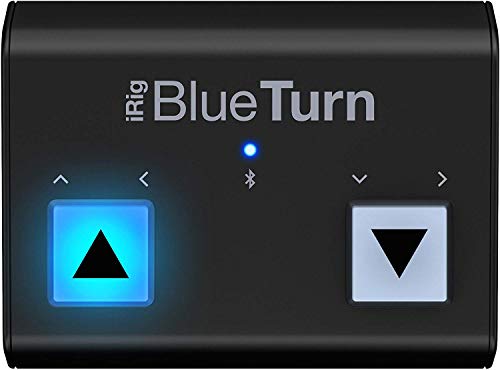
The iRig BlueTurn is designed for those who value complete silence above all else. Its backlit, rubberized buttons provide a soft-touch interface that never makes a clicking sound, making it perfect for knitting in quiet spaces or during a movie.
The low-profile design ensures it remains unobtrusive under a desk or chair. Because the buttons are so responsive, very little effort is required to trigger a page turn, which helps prevent muscle fatigue during marathon sessions of stockinette or repetitive garter stitch.
Be aware that the unit is quite compact, so it is best suited for stable surfaces. If the floor is thick carpet, the device might shift slightly unless placed on a rigid mat or board.
Cocomall Ring Remote: Best for Ultimate Portability
The Cocomall Ring Remote is the unconventional choice for the minimalist knitter. Worn like a ring on the finger, it puts the controls literally at the fingertips, allowing for page turns without moving a foot or breaking concentration.
This is a fantastic option for knitters who travel with their projects or work in small, cramped spaces where a floor pedal simply won’t fit. It is discreet, lightweight, and easily tucked into a project bag alongside a set of needles and a ball of yarn.
While highly portable, the battery life is generally shorter than that of the larger foot pedals. It is best used for shorter, quick-turn projects rather than all-day, intensive pattern management.
Donner Page Turner Pedal: Best Budget Foot Pedal

The Donner Page Turner is a reliable, no-frills entry point for any knitter looking to automate their digital pattern workflow. It offers the basic functionality of a standard pedal at a fraction of the cost of premium models.
Its sturdy build quality belies its affordable price, making it a great choice for those who are skeptical about investing in higher-end tech. The pedal has a solid weight that keeps it from sliding, even on hardwood floors.
While it lacks the sophisticated customization features of more expensive units, it performs the primary task perfectly. For the vast majority of knitting patterns, this pedal is all that is required to move seamlessly from one page to the next.
LEKATO Page Turner: A Compact and Quiet Option
The LEKATO pedal strikes a balance between size and functionality, offering a compact footprint that fits easily under a needle craft chair. It is notably quiet during operation, ensuring that the only sound in the room is the rhythmic click of knitting needles.
It connects quickly via Bluetooth and maintains a stable signal, which is essential for avoiding frustrating interruptions. The rechargeable battery is also a significant convenience, eliminating the need to hunt for spare AA batteries mid-project.
This pedal is ideal for the knitter who wants a balance of portability and performance. It is small enough to pack, yet robust enough to withstand daily use on a variety of flooring surfaces.
Why a Remote Page Turner Is a Knitter’s Best Friend
Knitting involves a delicate interplay of hand movements, and stopping to wipe pattern grease or oil from a tablet screen is a common point of frustration. By using a remote, the hands stay exactly where they belong: on the needles.
This continuity is particularly vital when working with high-twist wool or slippery silk yarns. Constant stopping and starting increases the likelihood of uneven tension or missed increases and decreases in a complex pattern repeat.
Ultimately, a page turner allows for a “flow state” that keeps the knitting process fluid and productive. By removing the physical barrier between the pattern and the hands, the pace of the project naturally increases.
Hand Remote vs. Foot Pedal: Which Is Right for You?
The decision between a hand remote and a foot pedal usually comes down to personal mobility and posture. Foot pedals are ideal for knitters who maintain a consistent seated position and enjoy the tactile feedback of a physical switch.
Hand-held remotes, like the ring-style devices, are better for those who like to shift positions, knit in a recliner, or lounge while working. If the knitting chair doesn’t have a stable surface underfoot, a hand remote provides much more consistent results.
Consider the physical demands of the project as well. If the pattern requires constant attention, a foot pedal allows the hands to focus entirely on intricate colorwork or complex cables without any interruption.
What to Look For in a Bluetooth Page Turner
When evaluating potential devices, battery life is perhaps the most critical technical consideration. Look for units that offer rechargeable lithium batteries, as they save money and reduce waste over the life of the tool.
Compatibility with specific knitting apps is another non-negotiable factor. Most modern remotes use standard Bluetooth HID profiles, which work with almost all tablet-based pattern readers, but always verify before purchasing.
- Connectivity: Look for Bluetooth 4.0 or higher for low latency.
- Build Quality: A heavy, non-slip base is vital if using a floor pedal.
- Response Time: The device should register a page turn instantly without a “sleep mode” lag.
- Silence: If knitting in shared spaces, prioritize silent, soft-touch switches.
Setting Up Your Remote With Knitting Apps
Setting up a Bluetooth remote is generally a straightforward process. First, ensure the device is charged and put it into pairing mode according to the manufacturer’s manual, then locate it in the Bluetooth settings of the tablet.
Once paired, open the knitting app and ensure the settings allow for “external input” or “page turning via Bluetooth.” Most popular apps will automatically detect the remote as a keyboard-style input.
If the app doesn’t recognize the remote immediately, check if the device has different “modes.” Sometimes switching from a standard HID mode to an iOS or Android-specific mode is all that is needed to establish a seamless connection.
Incorporating a Bluetooth page turner into a knitting workflow is a small adjustment that leads to significant improvements in both comfort and efficiency. While these tools may seem like high-tech additions to a traditional craft, they serve the age-old purpose of helping the maker focus on the stitches rather than the distractions. Choose the tool that best fits the specific environment of the knitting space, and enjoy the newfound freedom of a truly hands-free pattern experience.

