6 Best Timers For Lesson Pacing To Keep You On Track
Struggling to manage your class time? Discover the 6 best timers for lesson pacing to keep your instruction on track. Read our guide and improve your flow today.
Knitting is a rhythmic practice, but the steady click of needles can easily lull a maker into losing track of time. Without pacing, repetitive strain injuries become a genuine risk, and complex patterns often fall victim to tired eyes or wandering focus. Integrating a timer into a knitting routine transforms an aimless session into a structured, productive, and physically sustainable habit. Choosing the right tool ensures the focus remains on the stitches, not on the clock.
Time Timer MOD: Best for Visual Learners


The Time Timer MOD utilizes a disappearing red disk to represent the passage of time, making it an ideal choice for those who struggle to estimate how long a complicated lace repeat might take. By seeing the “time remaining” rather than just a digital readout, it becomes easier to judge whether there is enough left in a session to finish a row or complete a decorative cable.
This visual representation is particularly helpful when working on colorwork projects where keeping the tension consistent requires a fresh, alert mind. If a knitter finds themselves racing against a clock that is purely numeric, the anxiety of the ticking numbers often leads to skipped stitches or dropped yarn overs.
The bottom line: Use this timer if the goal is to cultivate a “flow state” without the jarring interruption of a digital alarm. It is best suited for desk-bound knitting sessions where the device can sit within the peripheral vision.
Lux Minute Minder: Best No-Frills Classic

The Lux Minute Minder is a mechanical workhorse that requires no batteries and features a simple, tactile dial. For knitters who want to avoid the glow of digital screens or the potential for low-battery failure mid-pattern, this analog classic offers total reliability.
Because it relies on a physical spring, it provides a satisfying, audible tick that reinforces the rhythm of the knitting. It is perfect for setting a 20-minute timer for a quick, focused session before heading out the door or during a short lunch break.
The bottom line: Choose this if the knitting space is minimalist or if the goal is to reduce screen time. It is durable enough to survive a tumble into a project bag, provided it stays shielded from sharp circular needles.
ThermoPro TM01: Best for Multi-Project Tracking
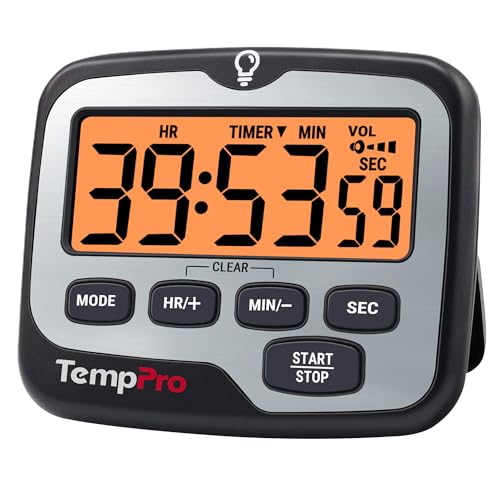
The ThermoPro TM01 is a dual-channel digital timer, allowing for two concurrent countdowns. This feature is highly effective for knitters who rotate between projects, such as keeping one session running for a complex stranded colorwork sweater while simultaneously tracking a short “break” timer for blocking or soaking finished swatches.
Having multiple channels allows for better management of secondary tasks that often get neglected. For example, a knitter can track the 30-minute interval for soaking superwash wool in a gentle detergent while keeping a separate timer active for a stretch break.
The bottom line: Invest in a dual-timer if the workspace is chaotic or if the project load involves active processing steps like washing and drying. It removes the need to juggle multiple devices.
Datexx TimeCube: Easiest Timer for Quick Breaks
The Datexx TimeCube is unique because it is gravity-activated; turning it to a specific side automatically starts that duration. For a knitter who needs to remember to stretch their shoulders every 15 or 30 minutes, this is the most frictionless option available.
There is no fiddling with buttons or menus, which is a major advantage when hands are covered in lint or currently holding a delicate silk-blend lace project. Simply flipping the cube to the desired number is enough to stay on track.
The bottom line: This is the ultimate tool for those who prioritize ease of use over precision. It is the best way to integrate mandatory ergonomic breaks into a long knitting session.
Amazon Echo Dot: Best Hands-Free Voice Timer
The Amazon Echo Dot allows a knitter to set timers using voice commands, which is invaluable when working with grippy, lace-weight mohair that requires both hands to remain stable. Setting a timer while mid-row—without needing to put down the project—prevents the loss of place in an intricate chart.
This is also useful for setting reminders to check the gauge or move a stitch marker after a certain number of repeats. The hands-free nature keeps the rhythm of the work uninterrupted and clean.
The bottom line: If the knitting area is tech-friendly, the Echo Dot is unbeatable for sheer convenience. It is the best choice for knitters who frequently find themselves wishing for a third hand.
Forest App: Best for Blocking Distractions
The Forest App gamifies time management by encouraging the user to stay off their phone while a virtual tree grows. For knitters who find themselves constantly checking social media or pattern updates, this app provides a strong incentive to put the device down and focus on the needles.
When the timer is set, the phone is locked, ensuring that the only activity is the physical act of knitting. It creates a dedicated block of “me time” where the smartphone becomes a tool for tracking progress rather than a source of distraction.
The bottom line: Use this if phone addiction is sabotaging knitting time. It is an effective psychological barrier against the constant urge to check messages while counting stitches.
How to Choose the Right Timer for Your Project
Selecting the correct timer depends entirely on the project’s complexity and the environment of the knitting space. For high-focus projects like complicated cables or intricate lace, a visual or hands-free timer is superior because it minimizes the need to look away from the work.
Consider the following criteria when making a purchase: * Tactility: Does the timer require buttons that might be hard to press with yarn-coated fingers? * Audibility: Is the alarm loud enough to be heard over background noise or a podcast? * Portability: Will it travel easily in a knitting tote? * Complexity: Do you need simple, one-touch activation or programmable intervals?
The bottom line: Match the timer to the knitter’s temperament. If a device requires too much setup, it will likely gather dust on a shelf rather than assist in the craft.
Analog vs. Digital Timers: Which Is Better?
Analog timers offer a calming, tactile experience that mimics the steady, mechanical nature of knitting itself. They are immune to software bugs and require no updates, making them a long-term, low-maintenance choice for the permanent knitting nook.
Digital timers, by contrast, offer precision and versatility that analog versions cannot match. They provide exact countdowns, multiple channels, and often integrate with other devices for a more seamless experience.
The bottom line: If the priority is reliability and a distraction-free environment, choose analog. If the goal is tracking multiple tasks or precise project timing, go digital.
Using Timers to Pace Complicated Patterns
When tackling a new or complex stitch pattern, breaking the work into manageable intervals prevents mental fatigue and reduces errors. Setting a timer for 45 minutes of “focused practice” allows the brain to absorb the rhythm of the pattern without the pressure to finish an entire row immediately.
If the stitch pattern involves a difficult sequence, such as a 12-row repeat, use the timer to track how long it takes to complete one full repeat. This provides a baseline for how long the rest of the project will take, which is helpful for realistic project planning and deadline management.
The bottom line: Pacing isn’t about speed; it’s about consistency. A timer helps maintain that consistency even when the pattern becomes challenging.
Pacing Your Knitting for Better Ergonomics
The most important reason to use a timer is to enforce ergonomic breaks. Knitting for hours on end, especially with small-gauge needles or heavy wool, can lead to muscle tension in the hands, wrists, and neck.
Program a timer to go off every 30 to 45 minutes, regardless of where the row stands. When the alarm sounds, put the needles down, stand up, and perform gentle stretches for the forearms and shoulders.
The bottom line: No project is worth a repetitive strain injury. Use a timer as an external conscience to force a rest before the body signals pain.
Integrating a timer into the knitting process is a simple shift that yields significant results in both project quality and personal well-being. By managing time intentionally, the craft remains an enjoyable pursuit rather than a cause for physical or mental exhaustion. Find a tool that fits your personal workflow and let it handle the clock so you can keep your focus where it belongs: on the yarn.