7 Best Remote Page Turners For Accessibility To Try
Discover the 7 best remote page turners for accessibility to simplify your reading experience. Read our expert guide now to find the perfect device for your needs.
Navigating complex charts or lengthy written patterns while managing yarn tension can be a significant hurdle for any knitter. A page turner removes the need to put down needles or pause mid-row to scroll on a tablet screen, keeping hands focused on the work. These devices bridge the gap between digital convenience and the tactile flow of a project. Choosing the right tool ensures that progress stays uninterrupted, whether working on a simple garter stitch scarf or a complicated lace shawl.
AirTurn DUO 200: The Gold Standard for Knitters


The AirTurn DUO 200 earns its reputation as the industry standard due to its exceptional build quality and reliability. It features two silent, tactile switches that allow for seamless forward and backward navigation through digital pattern files.
For the knitter working on a complex multi-page colorwork chart, this pedal provides a level of stability that cheaper alternatives lack. The non-slip base ensures it stays firmly planted on various floor surfaces, even when knitting for hours in a comfortable armchair.
While the price point is higher, the investment is justified for those who spend significant time with digital patterns. It is compatible with virtually every major operating system, making it a versatile tool that will last through years of evolving knitting projects.
PageFlip Firefly: Quiet and Incredibly Reliable

The PageFlip Firefly is favored for its illuminated pedals, which are a massive advantage in dim lighting. When knitting by lamplight or in a cozy, low-light nook, these subtle lights help locate the switch without looking away from the needles.
This model is remarkably quiet, ensuring that the rhythm of a knitting session remains undisturbed by mechanical clicking. It is particularly well-suited for those who share a living space or attend knitting circles where ambient noise is a concern.
Durability is a core feature here, as the hinge mechanism is built to withstand repeated use over many years. For the knitter who values peace and quiet as much as project organization, this pedal is an excellent choice.
IK Multimedia iRig BlueTurn: Best for Portability
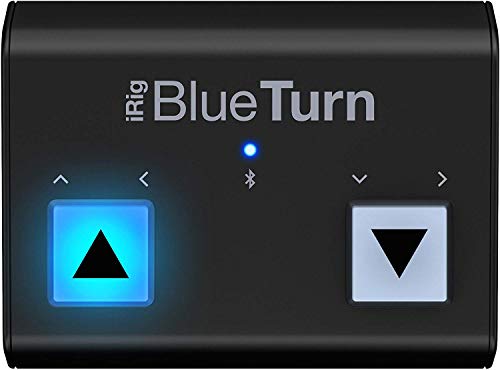
The iRig BlueTurn is remarkably compact and lightweight, fitting easily into any standard project bag. If knitting habits involve moving frequently between the living room, a local yarn store, or travel, this portability is its biggest asset.
The pedals themselves are backlit, similar to the Firefly, but the footprint is much smaller. This makes it ideal for knitters with limited floor space or those who prefer a minimalist setup that doesn’t clutter the crafting area.
Keep in mind that its smaller size means it can be less stable on plush carpeting compared to heavier, wider units. However, for a knitter on the go, the trade-off for convenience is well worth the minor sacrifice in weight.
Donner Page Turner Pedal: The Best Budget Option

The Donner pedal is the go-to for knitters who want to try a digital workflow without a major financial commitment. It offers basic, effective functionality that covers all the essential needs of a standard digital pattern viewer.
Despite the lower price tag, it is surprisingly sturdy and handles the occasional nudge of a foot quite well. It connects via Bluetooth, mirroring the performance of much more expensive models in standard, everyday knitting scenarios.
It lacks some of the advanced tactile feedback found in premium models, but for the average knitter, this is a non-issue. If the goal is simply to turn pages while focusing on keeping a consistent gauge, this pedal delivers.
Vidami Blue Pedal: For Following Video Patterns
The Vidami Blue is unique because it is designed specifically to interface with video-based tutorials and pattern walkthroughs. If the preferred method of learning a new technique—like a complex brioche stitch or provisional cast-on—is through online video, this is the superior tool.
The pedal allows for play, pause, and speed control, which is invaluable when repeating a tricky sequence. Instead of reaching for a mouse or screen with yarn-covered fingers, a quick tap of the foot keeps the instructional video in sync with the project.
It provides a more specialized workflow than standard page turners. While it can still turn pages for static documents, its real value lies in its ability to master new skills alongside a virtual instructor.
Coda Music Stomp: A Sturdy, Pro-Level Choice
The Coda Music Stomp is built with a heavy-duty chassis that feels virtually indestructible underfoot. It is designed for high-stress environments, which translates to a long, trouble-free lifespan in a home knitting studio.
The mechanical action is incredibly satisfying, providing a clear “click” that confirms a page has been turned. For knitters who prefer a tactile connection to their tools, this feedback loop provides confidence during long sessions of lace knitting where precision is paramount.
It is an investment piece, certainly, but one that avoids the fragility of budget plastic pedals. When the priority is a “buy it once” tool that will reliably navigate through thousands of charts, this is the primary candidate.
LEKATO Page Turner: Another Great Value Pedal
The LEKATO pedal offers a sleek design that manages to balance cost and performance impressively. It is highly responsive and pairs quickly with most tablets, making it a stress-free addition to a digital knitting library.
Its battery life is consistently impressive, surviving weeks of heavy daily use without needing a recharge. For the knitter who frequently forgets to plug in devices, this reliability is a significant functional benefit.
It represents a strong middle-ground option for those who find budget models too basic but aren’t ready to commit to top-tier professional gear. It is a workhorse that consistently performs the task at hand without fuss.
How to Pick a Page Turner for Your Knitting Setup
When selecting a pedal, first consider the physical environment. If the knitting area is mostly carpeted, a heavier pedal with a rubberized bottom is essential to prevent sliding during a row-turn.
Think about the primary way patterns are viewed. If the library consists mostly of digital PDF charts, a simple two-switch page turner is sufficient. If video tutorials are a primary source of information, look for pedals with advanced media control features.
Weight and portability are the next logical filters. A pedal that stays at a dedicated craft table can afford to be heavy and stationary, while a pedal that accompanies a project to workshops should be compact enough to fit comfortably in a project bag.
Connecting Your Pedal to Apps like KnitCompanion
Most page turners connect via Bluetooth in the same way a wireless mouse or keyboard would. Once paired with the tablet, the pedal essentially sends a “page forward” command that the app interprets as a navigation input.
Applications like KnitCompanion are designed to recognize these inputs automatically. In most cases, once the initial Bluetooth pairing is established, no further complex configuration is required to start turning pages.
Be aware that some apps require a quick check in their settings menu to confirm the pedal is recognized. If the pedal is connected but not turning pages, ensure the tablet’s Bluetooth is active and the app is currently the “active” window on the screen.
Foot Pedals vs. Other Remotes: A Quick Guide
Foot pedals are generally preferred by knitters because they keep both hands entirely dedicated to needles and yarn. Hand-held remotes, while smaller, require reaching out, which breaks the flow of the work and increases the chance of dropping a stitch.
Hand remotes are often useful for knitters with limited mobility who find foot operation difficult. These devices can be clipped to a chair or held easily, providing an alternative to the pedal-based system.
Ultimately, the choice comes down to personal comfort. Experimenting with both styles is recommended, but for the majority of knitters, the hands-free nature of a foot pedal remains the most ergonomic and seamless solution for an uninterrupted workflow.
Whether a knitter prefers simple paper charts or advanced digital apps, the addition of a reliable page turner can drastically improve the crafting experience. These tools eliminate the constant friction of pausing to move through patterns, allowing for a much deeper immersion into the rhythm of the work. By selecting the right pedal based on your specific knitting habits and environment, you gain the freedom to focus entirely on the beauty of the yarn and the precision of the stitches.