7 Best Digital Displays For Low Light Environments
Discover the 7 best digital displays for low light environments. Read our expert guide to choose the perfect screen for your specific lighting needs today.
Knitting by the glow of a bedside lamp or in a dimly lit living room presents a unique set of challenges for the dedicated maker. Relying on printed patterns in these conditions often leads to eye strain and missed lace eyelets, especially when working with dark-colored yarns. Digital displays bridge this gap, offering adjustable backlighting and the ability to zoom into intricate charts without needing a bright overhead light. Choosing the right device requires balancing battery life, screen clarity, and the tactile comfort needed for hours of quiet craft time.
Kindle Scribe: Best for Digital Pattern Notes
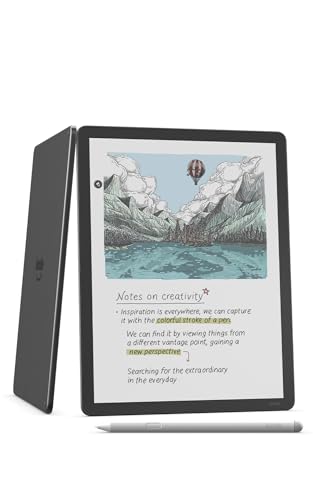

The Kindle Scribe serves as a dedicated canvas for knitters who treat their patterns like journals. Its glare-free screen mimics the look of paper, making it remarkably comfortable for long, low-light sessions without the harsh blue light emitted by tablets.
Writing notes directly onto a PDF pattern allows for tracking row counts or marking specific cable crosses as they happen. Because it lacks the distractions of social media or email, it keeps the focus entirely on the stitches.
However, the Scribe is a monochrome device, which poses a limitation for patterns that rely on color-coded charts for stranded colorwork. If the project involves simple textures or lace, the focused, paper-like experience is unparalleled.
iPad Air (M2): The Ultimate All-Around Craft Hub

For the knitter who balances pattern reading with video tutorials and complex colorwork, the iPad Air provides immense versatility. The high-resolution display renders intricate charts with perfect clarity, and the processing power handles heavy PDF files without a hint of lag.
Low light is rarely an issue given the brightness controls, though night-shift modes are essential to prevent eye fatigue during late-night sessions. It serves as a central station where row-counter apps, video lessons, and digital pattern libraries coexist seamlessly.
The primary tradeoff is battery longevity compared to E-ink devices. For those who lose track of time while knitting, keeping a charging cable nearby is a necessary precaution.
Samsung Galaxy Tab S9: Best for Vivid Colorwork
The OLED screen on the Galaxy Tab S9 offers near-infinite contrast, making it the superior choice for identifying subtle color shifts in complex Fair Isle patterns. When working with charcoal or black yarns, the deep blacks of the screen help distinguish stitch definition that would wash out on a lesser display.
The responsive stylus is excellent for those who prefer to strike through rows manually. Because the screen is so vibrant, it remains easy to read even in a room lit only by a single ambient lamp.
Be mindful that vibrant screens can be tiring to the eyes over several hours. Utilize the blue-light filter settings to ensure a softer, warmer glow that mimics candlelight rather than a clinical workspace.
Amazon Fire HD 10: Top Budget-Friendly Option
The Fire HD 10 offers a reliable, no-frills entry point for knitters who want to move away from paper patterns without a significant investment. It provides enough screen real estate to view a chart clearly, even when magnified, which is a major help for those working with fingering-weight wool on tiny needles.
While the display quality doesn’t match premium tablets, it is perfectly functional for basic chart reading and note-taking. It acts as a dedicated pattern viewer, sparing the phone from being tethered to a project bag.
Expect to manage the battery more frequently than with an E-reader. For the occasional project-based knitter, it is a highly practical utility tool that performs exactly as expected.
BOOX Note Air3 C: Best Color E-Ink for Charts

The BOOX Note Air3 C occupies a unique niche, offering a color E-ink screen that preserves the eye-friendly nature of paper while supporting color-coded knitting charts. This is a game-changer for complex projects where different colors indicate different motifs or cable directions.
The device feels like a notebook in the hands, which is far less distracting than a tablet. It allows for quick, effortless mark-ups during late-night knitting sessions, and the front-lighting system can be adjusted for warmth to stay comfortable at night.
It is a more sophisticated device that requires a bit of software configuration. For those who value the aesthetics of a printed page but need the utility of digital color, this is the gold standard.
Kobo Elipsa 2E: Best Non-Amazon PDF Reader
The Kobo Elipsa 2E is a streamlined, user-friendly alternative for knitters who prefer to avoid the Amazon ecosystem. It handles large PDF patterns with ease, allowing for smooth zooming and panning across complex, large-format lace charts.
The “ComfortLight” feature is particularly well-engineered, allowing for precise adjustments to both brightness and color temperature. This is vital when working with delicate fibers like silk or mohair, where precise stitch placement is paramount.
It is an excellent, dedicated tool that respects the user’s focus. By removing the temptation to check notifications, it creates a sanctuary for quiet, uninterrupted knitting.
ASUS ZenScreen OLED: Best Portable Craft Monitor
Sometimes, a knitter needs a larger view than a tablet can provide, especially when following expansive, multi-page patterns. The ZenScreen acts as an external monitor that displays charts with stunning sharpness, perfect for a dedicated knitting desk.
Because it is thin and lightweight, it can be tucked into a project bag or moved between a craft room and a living room chair. The OLED technology ensures that even in dark rooms, the contrast remains crisp, making it easier to read charts at a glance.
This is a companion device, not a standalone computer. It is best suited for the knitter who already keeps their pattern library on a laptop but needs a better, more portable screen for their workspace.
E-Ink vs. OLED: What’s Best for Knitting Patterns?
Choosing between E-ink and OLED comes down to how a knitter interacts with their pattern. E-ink technology is essentially reflective, similar to real paper, and relies on front-lighting that shines across the screen rather than into the eyes. This makes it the undisputed champion for hours of fatigue-free reading.
OLED screens, conversely, are emissive, meaning each pixel produces its own light. This creates deep, vibrant colors and sharp text, which is an advantage for identifying colors in stranded knitting or reading extremely small font sizes.
- Choose E-Ink if: You prioritize long battery life, avoid eye strain, and mainly knit from monochrome or simple charts.
- Choose OLED if: You work with complex colorwork, need to view high-resolution photos of finished items, or prefer a multi-functional device.
How to Set Up Your Device for Nighttime Knitting
Proper calibration is the difference between a relaxing knitting session and a headache. Begin by activating the “Night Mode” or “Blue Light Filter” on any tablet, shifting the color profile toward warmer, amber tones. This mimics the cozy glow of incandescent light and reduces the impact on circadian rhythms.
Next, lock the orientation to landscape if the pattern is a wide chart. This prevents the screen from rotating accidentally when you shift the needles or move the project on your lap.
Finally, consider the screen brightness. It should be just bright enough to read the text comfortably; if the screen is the brightest object in the room, it is set too high. A lower, warmer setting is almost always better for extended craft time.
Key Apps to Manage Your Digital Pattern Library
Effective digital organization keeps the focus on the yarn, not the file management. Apps like KnitCompanion are essential for serious knitters, as they allow for tracking rows, highlighting specific chart segments, and keeping notes on gauge changes.
For general PDF management, GoodReader or Adobe Acrobat provide robust annotation tools for marking up patterns as you work. If a pattern collection is sprawling, using a cloud-based service like Dropbox or Google Drive ensures that every project is accessible from any device.
Always aim for a workflow that requires minimal interaction. The goal is to move from a finished row to the next instruction with a single tap, allowing the hands to return to the needles immediately.
The best digital display is the one that disappears into the background, allowing the rhythm of the needles to take center stage. Whether you choose the paper-like serenity of an E-ink device or the vibrant clarity of an OLED screen, the right choice will make your late-night knitting hours far more productive and comfortable. Take the time to adjust the warmth and brightness of your chosen display, and you will find your craft sessions becoming much more meditative and error-free.