6 Best Electronic Pattern Readers For Digital Designs
Discover the top 6 electronic pattern readers for digital designs. This guide evaluates key features to help you streamline your workflow and boost precision.
Transitioning from paper patterns to a digital library is one of the most liberating upgrades a knitter can make for their craft. Whether you are juggling complex colorwork charts or simple stockinette, having your entire pattern collection at your fingertips saves precious space and sanity. This guide explores the best hardware to help you keep your place, annotate your notes, and focus on the rhythm of your stitches. Choosing the right device will transform your knitting sessions from cluttered to streamlined.
iPad Air: The Gold Standard for Knitting Patterns
The iPad Air is the device I see most often in knitting circles, and for good reason. Its color accuracy and high-resolution display are unmatched when you are working with intricate stranded colorwork charts. Being able to see the subtle differences between shades of blue or green in a chart prevents the common mistake of mixing up your contrast colors.
The processing speed is a massive advantage when you are dealing with large, high-definition PDF pattern files. If you have a pattern that includes multiple schematics, high-res photos, and embedded video tutorials, the iPad handles the navigation without any frustrating lag. You can zoom in on a specific stitch repeat without the image pixelating or the app stuttering.
However, the glossy screen can be a drawback under bright studio lights. If you are knitting in a room with harsh overhead lighting, you might find yourself constantly adjusting your seat to avoid glare. A matte screen protector is a simple, inexpensive fix that makes the iPad feel more like paper under your needles.
Samsung Galaxy Tab S9: Best Android for Knitters


The Samsung Galaxy Tab S9 offers a brilliant AMOLED screen that makes your pattern charts pop with incredible clarity. For knitters who prefer an Android ecosystem, this tablet provides a seamless experience for managing files across different platforms. The included S Pen is a standout feature, allowing you to mark your progress on a chart with the precision of a fine-tipped marker.
One of the best things about this tablet is its multitasking capability. You can easily keep your pattern open on one side of the screen and a tutorial video or your Ravelry queue on the other. It’s perfect for those moments when you’re learning a new technique, like a complex cable or a provisional cast-on, and need to watch a demo while keeping your place in the written instructions.
The build quality is sturdy, which matters when you’re tossing your gear into a project bag alongside sharp DPNs and heavy scissors. While it is a premium investment, the longevity of the hardware makes it a reliable companion for years of knitting. Just be mindful that Android apps for pattern management can vary in quality compared to iOS, so choose your software wisely.
Remarkable 2: Best E-Ink Reader for Eye Comfort

The Remarkable 2 is a dream for knitters who find backlighting fatiguing during long, late-night knitting sessions. Because it uses E-Ink technology, it looks and feels exactly like reading a printed page. There is absolutely no glare, which is a blessing if you are knitting by a window or under a lamp.
The device is incredibly thin and lightweight, making it feel like you are just holding a single pattern sheet rather than a bulky tablet. It is distraction-free by design, meaning you won’t be tempted to check emails or social media when you should be focusing on your row count. It is strictly for reading and annotating, which helps keep your mind in the "knitting zone."
The trade-off is the lack of color. If you are working on a complex fair-isle project where the chart relies on color-coding to distinguish between yarns, the Remarkable 2 will struggle to convey that information effectively. It is best suited for text-heavy patterns, lace instructions, or charts where you can easily swap colors for symbols.
Kindle Scribe: Best for Note-Taking and Reading
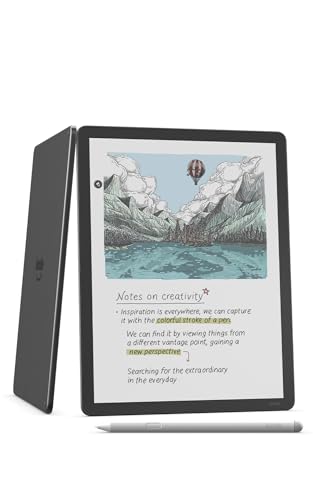
The Kindle Scribe bridges the gap between a standard e-reader and a digital notebook. Its large screen is perfect for displaying a full page of knitting instructions without needing to constantly scroll. The ability to write directly on the PDF pattern is a game-changer for tracking your row count or noting modifications you have made to the fit.
I particularly appreciate the battery life, which lasts for weeks rather than hours. When you are in the middle of a long-term project, like a sweater that takes months to complete, you don’t want to worry about your pattern reader dying mid-row. It’s a reliable, low-maintenance tool that stays out of your way.
The interface is slightly more restrictive than a full-blown tablet, which can be a double-edged sword. While it keeps you focused, it doesn’t allow for the same level of app integration as an iPad or Android tablet. If you rely on specific knitting apps to calculate gauge or resize patterns, you will still need your phone nearby.
Lenovo Tab P11: Best Value Tablet for Patterns
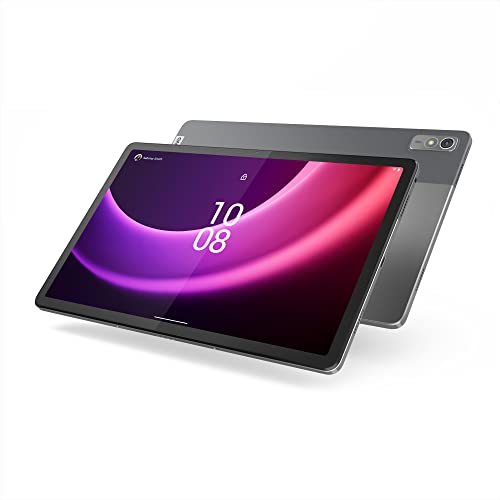
The Lenovo Tab P11 is a fantastic entry point for the knitter who wants digital convenience without the premium price tag. It handles PDF patterns with ease and provides a crisp, clear display that is more than sufficient for reading instructions. It is a workhorse that doesn’t pretend to be anything more than a reliable digital assistant.
For those on a budget, this tablet allows you to invest more of your hard-earned money into quality yarn rather than expensive hardware. It runs standard Android apps, meaning you can access all the popular knitting management tools without issue. It is a practical, no-nonsense choice for the maker who values function over flash.
Be aware that the performance may not be as snappy as the high-end tablets if you are juggling multiple heavy apps at once. However, for simply displaying a pattern and keeping track of your progress, it is more than capable. It’s a solid, dependable tool that gets the job done.
Onyx Boox Note Air3: Best Open Android E-Reader

The Onyx Boox Note Air3 is a unique hybrid that combines the eye-friendly E-Ink display with the flexibility of an Android operating system. This means you get the best of both worlds: the comfort of paper-like reading and the ability to install your favorite knitting apps. It is a sophisticated piece of tech for the tech-savvy knitter.
Because it runs Android, you can sync your patterns directly from cloud services like Dropbox or Google Drive. You aren’t locked into a specific ecosystem, which is a major advantage if you source your patterns from various designers and independent websites. It offers a level of customization that most dedicated e-readers simply cannot match.
The refresh rate is slower than a traditional tablet, which is a standard characteristic of E-Ink screens. It is perfectly fine for flipping through pages, but it isn’t meant for watching high-speed video tutorials. If you want a distraction-free, highly customizable device that won’t strain your eyes during a marathon knitting session, this is a top-tier choice.
Essential Features to Look for in Pattern Readers
When shopping for a device, prioritize features that directly impact your knitting workflow. A large, high-resolution screen is non-negotiable for reading complex charts. If the screen is too small, you will find yourself constantly zooming and panning, which breaks your rhythm and increases the chance of losing your place in the pattern.
Look for devices that offer robust annotation tools. Being able to highlight your current row, circle increases, or write notes about your yarn choice—such as "swatched on 4mm needles for correct gauge"—is vital. These notes become part of your pattern’s history and are invaluable if you decide to knit the same project again in a different fiber.
- Battery Life: Aim for a device that lasts through several long knitting sessions.
- File Compatibility: Ensure the device handles PDFs flawlessly, as this is the industry standard for digital patterns.
- Weight/Ergonomics: You want something comfortable to hold for hours, or something that fits easily into a stand.
- Cloud Syncing: The ability to access your files across multiple devices is essential for a growing library.
Tablet vs. E-Ink: Choosing the Right Display Tech
The choice between a standard tablet and an E-Ink reader comes down to your primary knitting environment. If you prefer knitting in a bright, sunny spot or under intense light, E-Ink is superior because it mimics the non-reflective quality of paper. It is the closest digital experience to having a printed pattern in your lap.
Tablets, conversely, are the winners for color-heavy projects. If you are a fan of stranded colorwork or intarsia, you need a screen that can accurately display the nuances of your yarn palette. A tablet also offers a much faster refresh rate, which is necessary if you frequently switch between your pattern and video tutorials.
Ultimately, consider your eyes. If you find yourself with a headache after an hour of screen time, an E-Ink device is the better investment for your health. If you are comfortable with screens and prioritize functionality and color, a tablet will serve you much better in the long run.
Essential Apps for Managing Your Digital Library
Your hardware is only as good as the software you run on it. Ravelry is the backbone of the knitting community, and having a mobile-friendly way to access your "Library" is essential. Most tablets allow you to save your Ravelry patterns directly to the device for offline access, which is a lifesaver when you are knitting at a retreat or on a flight.
For annotating, apps like GoodNotes or Xodo are excellent for marking up PDFs. They allow you to draw, highlight, and type notes directly onto your pattern files. These apps keep your digital patterns organized and ensure that your modifications are saved for future reference.
Don’t overlook simple cloud storage solutions like Google Drive or Dropbox. Keeping your patterns in a organized folder structure—by garment type, yarn weight, or designer—makes it infinitely easier to find your next project. A well-organized digital library is just as satisfying as a well-organized stash.
Tips for Organizing Your Knitting Pattern Files
Start by creating a naming convention that works for you. I recommend including the designer’s name and the pattern title in the file name, such as "DesignerName_PatternTitle_Version.pdf." This simple step prevents your download folder from becoming a chaotic mess of generic file names like "pattern_final_v2.pdf."
Use subfolders to categorize your patterns by project type, such as "Socks," "Sweaters," or "Accessories." You might also want a folder specifically for "Swatched" or "In Progress" patterns. This keeps your active projects front and center while tucking away the patterns you aren’t ready to cast on yet.
Finally, back up your digital library regularly. A hard drive crash or a lost tablet shouldn’t mean the loss of your entire pattern collection. Keep a copy in the cloud and another on a physical external drive to ensure your library is safe, secure, and ready for your next cast-on.
Investing in a dedicated pattern reader is about removing the friction between you and your craft. By choosing a device that suits your lighting preferences and project complexity, you can spend more time enjoying the meditative quality of your stitches. Whether you choose the vibrant screen of an iPad or the paper-like comfort of an E-Ink reader, your digital library will soon become your most trusted knitting companion. Happy knitting, and may your gauge always be spot on.