6 Best Magnetic Stands For Tablet Display To Consider
Upgrade your workspace with our top 6 picks for the best magnetic stands for tablet display. Read our expert review and choose the perfect mount for your setup.
Following digital patterns during a marathon knitting session requires more than just a tablet; it requires a reliable, ergonomic way to keep that chart at eye level. Neck strain and poor posture quickly turn a relaxing afternoon of stockinette into a physical chore. A proper magnetic stand transforms a tablet from a flat, awkward screen into a functional knitting companion. Choosing the right mount ensures that even the most complex Fair Isle charts remain perfectly visible as needles fly.
Lamicall Magnetic Tablet Stand: Best Overall
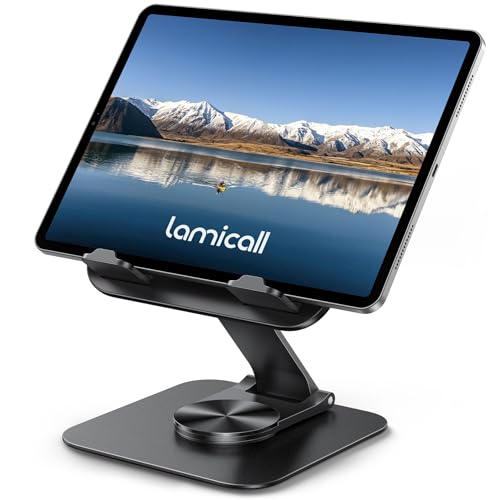

The Lamicall Magnetic Tablet Stand serves as the gold standard for most knitters due to its balance of simplicity and rock-solid stability. Its weighted base ensures that the stand remains stationary even when bumped during a vigorous row of cable work.
The magnetic connection is remarkably strong, allowing the tablet to snap into place instantly. This is a significant advantage when hands are covered in lint or temporarily occupied with managing a complex yarn tension.
- Pros: Minimalist footprint that leaves plenty of room for skeins and notions.
- Cons: The magnetic strength requires a compatible case or magnetic plate.
Bottom line: For the average knitter working through standard patterns on an iPad, this is the most reliable choice available.
Twelve South HoverBar Duo: Most Versatile Pick

When working from a lounge chair or a dedicated craft desk, the Twelve South HoverBar Duo offers unparalleled flexibility. This arm-style mount attaches via a clamp or a weighted base, meaning it can be positioned directly over a knitting project without obstructing the lap.
The articulated arm allows for precise adjustments in height and angle. This is vital when moving from a high-backed armchair to a table for winding yarn or organizing a messy stash of wool.
- Pros: Exceptional height and tilt adjustment for ergonomic comfort.
- Cons: The setup is more complex than simple desktop stands.
Bottom line: Choose this if the goal is to float the pattern directly in the line of sight, regardless of seating position.
UGREEN Tablet Stand Holder: Top Budget Choice
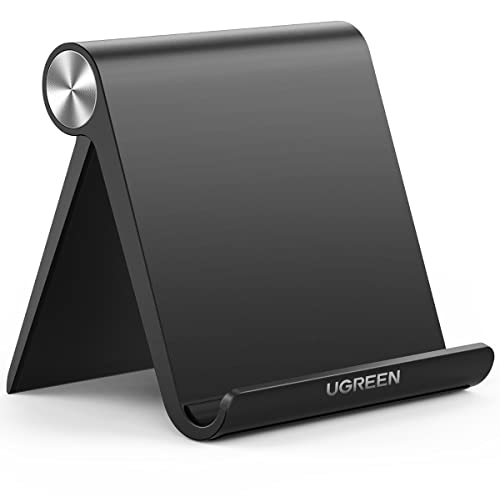
The UGREEN magnetic stand is an affordable solution that does not sacrifice essential functionality for a lower price point. It maintains a sleek profile that slides easily into a project bag alongside circular needles and stitch markers.
While it lacks the heavy-duty articulation of more expensive arms, it provides a stable viewing angle for most table-top knitting setups. It is perfect for those who want a dedicated space for a digital pattern without a major financial investment.
- Pros: Highly portable and very easy to store when not in use.
- Cons: Limited in terms of height adjustment compared to arm-based stands.
Bottom line: An excellent entry-level option for knitters who primarily follow patterns at a desk or coffee table.
KABCON Tablet Stand: Best for Large Tablets

Large-format tablets require a stand that can handle extra weight without sagging or tipping over. The KABCON stand is specifically engineered with heavy-duty hinges to support larger devices often used for high-resolution lace charts or multi-page schematics.
When working on intricate lace or complex stranded colorwork, being able to zoom in on a large screen is a major benefit. This stand ensures that the tablet stays exactly where it is positioned, even during long, stationary sessions.
- Pros: Heavy-duty build prevents the “drift” often seen with cheaper, lightweight stands.
- Cons: A heavier footprint means it is less convenient to throw into a small project tote.
Bottom line: If the knitting setup relies on a 12.9-inch tablet, this stand offers the necessary structural integrity.
AboveTEK Long Arm Stand: Best for Positioning

The AboveTEK Long Arm Stand is designed for knitters who need a specific focal point while remaining in a relaxed position. Its long, adjustable reach allows the tablet to be positioned over the lap or out to the side of a knitting chair.
This level of control is essential for preventing the “knit-neck” posture that leads to soreness after hours of work. Being able to place the screen at eye level helps maintain a neutral spine, which is crucial when tackling long-term projects like heirloom blankets.
- Pros: Superior range of motion for unconventional seating arrangements.
- Cons: The clamp attachment requires a sturdy table or shelf edge.
Bottom line: Invest in this model if comfort and ergonomics are the primary concerns for long knitting sessions.
Viozon Magnetic Stand: Stylish Desktop Option
The Viozon magnetic stand offers a modern, clean aesthetic that complements a well-organized craft space. It features a rotating mount that allows for an effortless switch between portrait and landscape modes, which is incredibly useful for varying pattern layouts.
Many patterns transition from vertical stitch instructions to horizontal charts; the ability to rotate the device without removing it from the mount is a subtle but impactful quality-of-life feature. It feels like a permanent piece of professional equipment on a yarn-filled desk.
- Pros: Highly adjustable rotation makes pattern transitions seamless.
- Cons: Slightly more expensive than basic fold-up stands.
Bottom line: For the knitter who appreciates a tidy, functional studio, this stand is both beautiful and highly efficient.
Choosing a Stand for Your Knitting Style
Different knitting projects demand different viewing needs. A quick project like a hat might be worked on the go, while a complex Fair Isle sweater requires hours of focus on a single chart.
If a knitter is prone to frequent position shifts, a flexible arm stand is mandatory. Conversely, if the knitting space is static, a simple desktop magnetic stand will suffice. Always consider the space available; a cluttered table with swift winders and ball-winder scraps needs a stand with a small footprint.
- Portrait vs. Landscape: Ensure the stand supports the preferred orientation for the specific pattern document.
- Stability: Always check the base weight to prevent tipping when reaching for yarn.
Bottom line: Match the stand’s mechanical capabilities to the physical demands of the project type.
Magnetic vs. Grip Holders: Which Is Better?
Magnetic stands offer a seamless “snap-on” experience that is far faster than manually adjusting spring-loaded grips. For knitters who frequently switch their tablet between the stand and their hands, the magnet is objectively superior for efficiency.
However, grip holders provide universal compatibility without requiring a specific case or a metal adhesive plate. If multiple tablets or e-readers are used throughout the house, a grip holder is a more versatile tool.
- Magnetic: Faster, cleaner, but requires hardware compatibility.
- Grip: Versatile, accommodates all devices, but involves more effort to secure.
Bottom line: Choose magnetic for pure convenience and speed; choose grips for maximum versatility across multiple devices.
Will Your Tablet and Case Fit? What to Check
Not all magnetic stands are compatible with every tablet case thickness. A case that is too thick will weaken the magnetic pull, leading to a precarious situation where the tablet might slip during a delicate bit of lace work.
Always measure the depth of the tablet case and ensure it is compatible with the manufacturer’s suggested magnets. Some stands include a metal plate that must be adhered to the back of the case; verify if this interferes with wireless charging or other device features before installation.
- Check List: Verify case thickness, weight limit of the stand, and mounting method.
- Pro-Tip: If the magnet feels weak, a thinner, specialized magnetic-compatible case is a worthwhile upgrade.
Bottom line: Double-check specifications to ensure the magnet can hold the tablet’s weight through the specific case in use.
Tips for Setting Up Your Digital Pattern Display
Setting up the digital workspace is as important as choosing the right needles. Aim to keep the tablet at a height that allows the eyes to look forward rather than down at the lap.
Use a screen-dimming app or night mode settings to reduce eye strain, especially during evening knitting sessions. Finally, keep a microfiber cloth nearby; stray mohair fibers or dust can easily accumulate on the tablet screen and become distracting during intricate pattern reading.
- Lighting: Position the stand away from direct glare to avoid squinting.
- Workflow: Use a stylus to tap through patterns to avoid leaving finger oils on the display.
Bottom line: Optimize the digital environment to keep the focus entirely on the yarn and the stitch count.
Finding the perfect magnetic stand is an investment in the longevity of one’s knitting hobby, as it directly impacts both physical health and the enjoyment of complex patterns. By prioritizing the right combination of stability, height, and ease of use, a knitter can create a seamless, professional-grade workstation. Choose wisely, keep that pattern in view, and enjoy the rhythm of the needles.