
6 Best Page Turners For Accessibility To Use
Discover the 6 best page turners for accessibility to simplify your reading experience. Read our expert review and find the perfect device for your needs today.
Struggling to read a complex lace chart while keeping tension on your yarn can quickly turn a relaxing session into a frustrating chore. Digital patterns are a miracle for accessibility, but manual screen-tapping often leads to dropped stitches or uneven gauge. A page turner eliminates the need to touch your tablet mid-row, allowing for a seamless flow that preserves your rhythm. Selecting the right device transforms how you work with intricate stitch repeats or long colorwork charts.
AirTurn DUO 200: Best Overall Hands-Free Choice


The AirTurn DUO 200 stands out because of its robust build and highly responsive tactile switches. It remains the gold standard for knitters who need a reliable, set-it-and-forget-it solution that functions perfectly on both carpeted floors and hardwood.
For those working on complex, multi-page patterns like garments that require constant reference to schematic measurements or legend keys, the stability of this unit is unmatched. It avoids the annoying “ghost clicks” that plague cheaper Bluetooth pedals.
The battery life is exceptional, lasting for dozens of full-length sweater projects before needing a recharge. While the footprint is larger than some competitors, the trade-off is a professional-grade experience that won’t slide away while working on a dense, heavy project like a wool-blend fisherman’s sweater.
iRig BlueTurn: Best for Low-Light Knitting
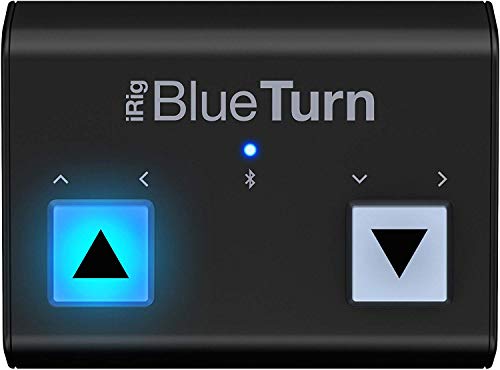
Knitting in the evening hours often creates a challenge for those using backlit screens or dimmed settings. The iRig BlueTurn features illuminated buttons, making it the premier choice for knitters who prefer working in a cozy, low-light environment without needing to hunt for the pedal in the dark.
The backlighting is soft enough to avoid being a distraction from the pattern display. Its compact, low-profile design fits easily into any knitting bag, making it a favorite for traveling to stitch circles or guild meetings.
Be aware that the silent, touch-sensitive switches require a slightly different technique than traditional mechanical pedals. Once the rhythm of a light tap is mastered, it provides a silent, efficient way to move through rows without breaking focus.
Donner Page Turner: Best Budget-Friendly Pedal

The Donner Page Turner proves that accessibility tools do not need to be expensive to be effective. It is a sturdy, functional entry point for knitters who are just beginning to integrate digital patterns into their workflow.
This unit excels for the occasional knitter or those who are still building a library of digital patterns. It connects quickly to most tablets and provides a satisfying mechanical “click” that confirms a page has turned, which is helpful when tracking repeats in a textured stitch pattern.
While the build is primarily plastic, it holds up well under standard use. If you are looking to test the waters of hands-free turning without a significant financial commitment, this device offers the best performance-to-price ratio currently available.
Fintie Remote: Best Compact Handheld Option

Not every knitter wants a pedal at their feet, especially when working in a recliner or a tight space. The Fintie Remote is a small, handheld device that can be kept in a pocket or hung from a project bag, allowing for thumb-based navigation of digital files.
This is particularly useful for knitters who work with a variety of seating arrangements or those who prefer to keep their floor space clear of cords and hardware. It provides a tactile, reliable way to turn pages without requiring any physical movement of the legs or feet.
The primary trade-off is that it requires one hand to operate, which may temporarily pull focus from the needle tips. However, for those comfortable with a quick movement, it is the most portable and least intrusive option for managing long charts on the go.
PageFlip Firefly: The Quietest Pedal Turner
Auditory distractions can be a nuisance during long sessions of meditative knitting. The PageFlip Firefly is engineered to be exceptionally quiet, utilizing silent switches that ensure a tranquil environment even when turning pages frequently.
Beyond the silence, the inclusion of custom pedal modes allows for precise control over how patterns are navigated. This is a significant advantage when using advanced knitting apps that allow for zooming, scrolling, or custom page jumps.
The unit is slightly heavier and more substantial than other pedals, which acts as an anchor on almost any surface. For knitters who prioritize peace and quiet above all else, this investment provides a silent, seamless experience.
STOMP Page Turner: Most Durable for Travel
Durability is paramount for the knitter who frequently attends retreats, workshops, or long-distance travel. The STOMP Page Turner is built like a tank, designed to withstand the jostling and impact that comes with a life of constant movement.
The reinforced housing protects the internal components from the pressures of being packed into a crowded project bag alongside metal needles and heavy yarn balls. It is the most reliable option for ensuring that your digital chart tool works the moment you set up at a new location.
While its weight may be a consideration for those trying to keep a travel kit light, the trade-off for longevity is worth it. You will find that it continues to function perfectly regardless of how often it is moved or stored.
How to Choose: Pedal vs. Handheld Page Turner
Choosing between a pedal and a handheld remote depends entirely on your specific knitting setup. Pedals are ideal for knitters who maintain a consistent, stationary position and want to keep both hands focused on the needles at all times.
Handheld devices are better for those who knit in varied locations or prefer not to manage cables or floor-based equipment. If you often experience fatigue or have limited mobility, a pedal might actually be more comfortable, as it utilizes the stronger muscles of the legs rather than the hands.
Always consider your storage capacity and the type of yarn you carry, as some smaller remotes are easily lost in large bags of fluffy mohair or bulky wool. Ultimately, the best tool is the one that you actually remember to bring to your knitting spot.
Setting Up Your Turner with Knitting Apps
Pairing your turner with a knitting app is usually a straightforward process of Bluetooth synchronization. Most modern page turners function as simple keyboard simulators, meaning the app will recognize them as a “right arrow” or “down” command.
Check your specific knitting app settings to see if it allows for key remapping. This is a game-changer for complex projects, as you can often program the pedal to jump directly to the row you are currently working on rather than just scrolling down.
If the turner does not connect, ensure your tablet is not already paired with a nearby speaker or pair of headphones. A quick toggle of the Bluetooth settings on your tablet usually solves most connectivity issues.
What to Look For in a Page Turner for Patterns
When choosing a turner, pay close attention to the responsiveness of the trigger. Knitting requires high concentration, and you do not want to wait for a delay when you are in the middle of a delicate lace row.
Consider the surface where you knit; a rubberized base is essential for hardwood floors, while a wider base is necessary for stability on thick carpeting. Also, evaluate the power source, as replaceable batteries are often preferred by traveling knitters who may not be near a charging port for days.
Finally, prioritize devices with a physical “on/off” switch. This prevents the device from accidentally turning on inside a project bag and draining the battery before you are ready to start your next session.
Page Turner FAQs for Digital Pattern Users
Does a page turner work with every knitting app? Most turners work with any app that supports standard navigation keys, though some advanced knitting-specific apps offer better integration.
Can I use a page turner with a smartphone? Yes, as long as your phone has Bluetooth and the app supports navigation, a turner will work just as well on a phone as it does on a tablet.
Will the pedal scratch my hardwood floors? Most quality turners come with protective feet, but adding a small piece of felt or a thin yoga mat underneath the pedal is an easy way to ensure total protection.
Do I need special software to install the turner? No, these devices are “plug-and-play” and are recognized as external input devices by both Android and iOS systems immediately upon pairing.
Investing in a high-quality page turner is an investment in your own knitting longevity and comfort. By removing the friction of manual navigation, you allow yourself to stay fully immersed in your work, ensuring that every stitch remains consistent from the first row to the final bind-off.