6 Best Remote Triggers For Self-Filming Knitting Demos
Level up your content with these 6 best remote triggers for self-filming knitting demos. Explore our top expert-tested picks and start recording today!
Capturing the perfect knitting tutorial requires more than just high-definition video; it demands a seamless flow between working the yarn and managing the camera. When hands are covered in mohair fuzz or struggling with a complex cable repeat, fumbling with a smartphone screen inevitably ruins the shot. Remote triggers turn a static camera into a virtual cinematographer, ensuring every stitch sequence is recorded without interrupting the creative rhythm. These tools transform the daunting task of self-filming into a manageable, professional process that allows the craft to take center stage.
CamKix Shutter Remote: Best Budget Clicker


The CamKix Shutter Remote is the entry-level standard for those just beginning to document their process. It is a tiny, unassuming Bluetooth device that pairs instantly with most smartphones, making it ideal for quick clips of a completed row or a specific bind-off technique.
Because of its diminutive size, it can be tucked into a notions pouch or taped to the side of a table. It is inexpensive enough to keep in multiple project bags, ensuring that a remote is always on hand when inspiration strikes.
However, the small form factor is also its primary weakness. The buttons can be fiddly for knitters with larger hands or those whose dexterity is compromised by repetitive strain. It is a tool for simplicity, not for high-production, multi-take shooting sessions.
UBeesize Tripod with Remote: Best All-in-One Kit
The UBeesize Tripod serves as a foundation for knitters who do not yet own a dedicated camera support system. This kit packages a flexible, wrap-around tripod with a reliable Bluetooth remote, solving the dual problem of stability and control simultaneously.
The flexible legs are particularly useful in a craft room setting, as they can be wrapped around chair arms or high-backed stools to achieve an overhead “bird’s-eye” view. Achieving this angle is critical when demonstrating stitch anatomy or explaining how to count stitches in a lace repeat.
The remote included in this kit is functional, though it lacks the advanced features found in professional-grade hardware. It is the perfect choice for the knitter who wants to move from amateur phone-propped-on-a-stack-of-books setups to a structured filming environment.
iRig BlueTurn Pedal: Ultimate Hands-Free Filming
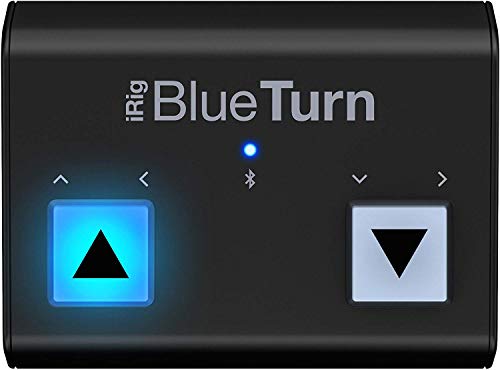
For knitters working with complex colorwork or long-tail cast-ons where both hands must remain occupied, the iRig BlueTurn is the gold standard. This is a floor-based pedal system that allows for remote triggering via a simple foot tap.
By placing the pedal under the desk or near the knitting chair, control becomes an extension of the body’s natural movement. It eliminates the need to reach out, stretch, or reposition hands, which preserves the tension of the yarn and prevents dropped stitches during a take.
The tradeoff is complexity; it requires a bit more technical setup than a simple handheld button. Nevertheless, for those filming long, uncut tutorials or instructional masterclasses, the freedom of movement it provides is unmatched.
Pro Camera App: Best Voice-Activated Solution
Sometimes the most effective tool is one that requires no physical hardware at all. Many advanced camera apps offer voice-activated shutter triggers, which allow a knitter to start and stop recording simply by speaking a command.
This is exceptionally helpful when trying to capture a transition from English to Continental knitting styles. Instead of reaching for a remote, one simply speaks a pre-set word, allowing the hands to remain perfectly positioned on the needles and yarn.
The primary limitation is ambient noise. If the needles are clacking loudly against one another or a knitting podcast is playing in the background, the app may struggle to distinguish the voice command. It performs best in a quiet, controlled environment.
Satechi Media Button: Most Discreet Remote Option
The Satechi Media Button is designed for those who value aesthetics and minimalism in their studio space. It is a sleek, wireless button that can be mounted to a surface or kept nearby without creating visual clutter.
Its tactile response is superior to most generic remotes, providing a satisfying “click” that confirms the signal was sent. This is vital when the camera is positioned far away or tucked into a lighting rig, as it provides physical feedback that the recording state has actually changed.
While it is more expensive than basic generic clickers, it is built to last through years of filming. It is an investment for the knitter who plans to build a permanent, dedicated content creation station rather than a temporary setup.
Canon BR-E1: For Serious DSLR & Mirrorless Rigs
When a project graduates to a mirrorless or DSLR setup to capture the delicate sheen of silk or the subtle texture of alpaca fiber, the Canon BR-E1 is the logical choice. It offers a stable, reliable wireless connection that outclasses standard Bluetooth phone remotes.
This remote offers precise control over the camera’s shutter and focus, which is essential for macro photography of stitches. When working with fine-gauge yarn or intricate lace, keeping the focus sharp on the needle tip is non-negotiable.
The downside is that it is proprietary gear; it only works with compatible camera systems. It is not a universal solution, but for the serious knitter-vlogger, it provides the reliability needed for professional-grade productions.
Choosing Your Remote: Bluetooth, App, or Pedal?
Selecting the right trigger depends entirely on the knitting scenario. For quick, informal process updates on Instagram, a simple Bluetooth handheld button is sufficient. For long-form, step-by-step instructional tutorials, a hands-free pedal is superior.
If the goal is to film while seated, consider the reach required to trigger the camera. A pedal keeps the hands on the needles, while a handheld remote can be hidden in a palm or a ball of yarn.
- Bluetooth Buttons: Best for mobility and quick setups.
- Pedal Systems: Necessary for continuous, hands-free work.
- Apps: Best for zero-clutter environments.
Ultimately, the best tool is the one that disappears from the process. If a remote requires conscious effort or repositioning, it will eventually disrupt the flow of the knitting.
Positioning Your Remote for Uninterrupted Knitting
Placement is the unsung hero of self-filming. A remote mounted on the side of a knitting table is usually more effective than one held in the hand, as it prevents camera shake when the button is pressed.
When using a pedal, ensure the cable or connection is secure. There is nothing more frustrating than mid-tutorial realization that the remote has become disconnected or hidden under a dropped skein of yarn.
Consider using Velcro or non-slip grips to secure the remote to a specific spot on the work surface. This makes finding the button automatic, allowing for a seamless transition between knitting and filming without looking away from the project.
Tips for Silent, Shake-Free Remote Operation
To achieve a professional look, the transition to filming must be invisible. Press the remote button firmly and immediately release it to prevent vibrations from traveling through the mounting arm and shaking the camera.
If the remote emits a clicking sound, dampen the noise with a small piece of fabric or felt. The sound of a loud “click” during a quiet tutorial can be jarring for viewers and disrupt the meditative atmosphere of a knitting video.
Always verify the framing before hitting record. If the remote has a slight delay, it is helpful to start the recording, take a breath, and then begin the knitting movement, trimming the extra footage during the editing phase.
Smartphone vs. DSLR: Matching Remotes to Your Gear
The choice of remote is often dictated by the camera itself. Smartphone cameras have sophisticated software, making them compatible with almost any Bluetooth remote or voice-command app, which simplifies the entry-level experience.
DSLR and mirrorless cameras, conversely, require remotes that communicate via infrared or specialized radio signals. While these are less “plug-and-play,” they offer far more control over exposure and aperture, which is essential for capturing the unique characteristics of different fibers.
Always prioritize the stability of the connection over the feature set. A basic remote that triggers every time is infinitely better than a high-end, feature-rich remote that occasionally drops the signal during a complicated stitch sequence.
By matching the remote to the specific needs of the project—whether it is a simple garter stitch washcloth or an intricate, multi-cable heirloom sweater—knitters can finally capture their work as beautifully as they create it. Choosing the right tool eliminates the friction between the craft and the camera, allowing for tutorials that are as fluid and clear as the knitting itself. Consistency in setup will eventually make filming feel like just another part of the project routine, rather than a separate, daunting hurdle. Happy filming, and may every stitch be as crisp on screen as it is on the needle.