7 Best Adjustable Tablet Stands For Digital Knitting Patterns
Find the perfect view for your digital patterns. We review the 7 best adjustable tablet stands to improve your knitting ergonomics and boost your efficiency.
Transitioning from paper patterns to digital displays can feel like a daunting shift for those of us who have spent decades marking up printed pages with highlighters. However, having your pattern at eye level significantly reduces the neck strain that often accompanies long sessions of complex lace or colorwork. The right stand isn’t just a gadget; it’s an ergonomic tool that keeps your focus on your tension rather than your posture. These seven options cater to different knitting styles, ensuring your tablet stays secure while you work through your next project.
Lamicall Adjustable Tablet Stand: Best Overall


This stand is the gold standard for most knitters because of its simple, intuitive design. It provides a stable base that doesn’t wobble even when you’re aggressively pulling yarn from a center-pull ball.
The hinge mechanism is stiff enough to hold the weight of larger tablets without slipping during a long session. If you are working on a complicated cable chart, you can adjust the angle to eliminate glare from overhead lights.
It folds flat, making it easy to toss into your project bag alongside your circular needles and notions pouch. While it lacks the extreme reach of a mounted arm, its reliability makes it the most versatile choice for a standard knitting chair or sofa.
AboveTEK Long Arm Tablet Mount: Best for Charts

When you are deep into a complex stranded colorwork project, you need your chart to be exactly at eye level. This mount clamps onto a table or shelf, bringing the screen toward you so you don’t have to hunch over your needles.
The long, articulated arm is a lifesaver for those of us who suffer from "knitter’s neck" after hours of focus. It allows you to position the tablet hovering right over your knitting space, keeping your neck in a neutral, healthy position.
Be aware that this requires a sturdy surface to clamp onto. If your favorite knitting spot is a soft armchair without a nearby table, this might not be the right fit for your setup.
UGREEN Tablet Stand Holder: Best for Portability

For knitters who frequent local yarn store meetups or travel to retreats, a bulky stand is a major inconvenience. The UGREEN model is minimalist and lightweight, designed to slide into a pocket of your knitting bag without adding bulk.
It offers several preset angles, which is perfect for shifting between upright chart viewing and a flatter angle for quick row-counting. The rubberized grips ensure that even a tablet in a heavy-duty case won’t slide around.
While it isn’t as adjustable as a multi-jointed arm, it is the ultimate travel companion. It’s ideal for keeping your pattern accessible while you’re knitting on a train or in a cramped hotel room.
Moft Float Stand: Best Lightweight Option

If you want a stand that essentially becomes part of your tablet, the Moft Float is an engineering marvel. It is incredibly thin and attaches directly to your device, meaning you never have to worry about forgetting your stand at home.
It is particularly useful for knitters who use their tablets for more than just patterns, like watching tutorials or listening to podcasts while working. The "float" feature allows you to elevate the screen to eye level without needing a separate, heavy base.
The tradeoff here is that it is device-specific and adds a slight permanent profile to your tablet. However, for the streamlined, tech-savvy knitter, it is a game-changer for weight management in your project bag.
Tryone Gooseneck Tablet Holder: Best Flexibility
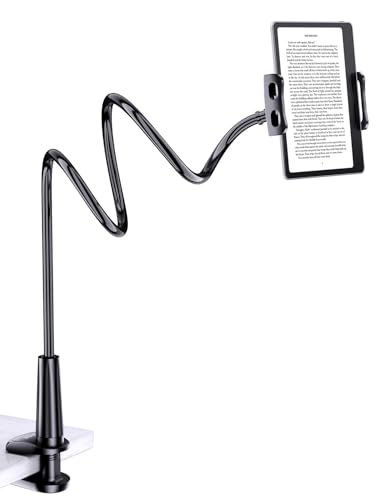
The gooseneck design is the most forgiving option for those who knit in unconventional spaces. Because the neck can be bent into any shape, you can wrap it around a chair leg or hook it onto a side table.
This flexibility is perfect for adjusting your pattern display as you shift positions during a long weekend of marathon knitting. If you like to prop your feet up or change your posture frequently, this stand keeps up with you.
The only downside is the "bounce." If you are a vigorous knitter, the neck can sometimes vibrate slightly, which might be distracting if you are working with very fine charts.
CTA Digital 2-in-1 Stand: Best for Floor Use

Sometimes you don’t have a table nearby, and that’s where a floor-standing model shines. This stand is heavy and stable, designed to stand on its own beside your favorite armchair or sofa.
It is a fantastic solution for knitters who prefer to keep their workspace clear of devices. By keeping the tablet on a separate stand, you avoid the accidental yarn snags that happen when a tablet sits too close to your working needles.
It is less portable than other options, so consider this a permanent fixture for your primary knitting nook. It is the best investment for your long-term ergonomic health if you spend hours at a time knitting at home.
OMOTON Desktop Tablet Stand: Best Budget Choice
You don’t need to spend a fortune to get a functional, sturdy stand. The OMOTON is a simple, elegant piece of aluminum that does exactly what it promises without any unnecessary bells and whistles.
It is surprisingly heavy for its size, which prevents it from sliding across a slick wooden surface. It’s a great "starter" stand for someone just beginning to digitize their pattern library.
While it lacks the adjustable height of more expensive models, it provides a perfect viewing angle for most knitters. It is a no-nonsense tool that respects your budget while solving the problem of pattern visibility.
How to Position Your Tablet for Ergonomic Knitting
The goal is to keep your gaze horizontal, which prevents the repetitive strain that comes from looking down at your lap for hours. When your neck is bent, your cervical spine bears significantly more weight, which can lead to fatigue and tension headaches.
- Eye Level Alignment: Position your tablet so the top third of the screen is at eye level.
- Distance Matters: Keep the screen about 18-24 inches away to minimize eye strain.
- Lighting Control: Angle your screen away from direct light sources to avoid glare, which causes you to squint and tense your facial muscles.
If you find yourself leaning forward to read a chart, your tablet is too far away or the font size is too small. Adjust your device settings to increase the text or chart scale before you adjust your posture.
Essential Features for Knitting Pattern Displays
When shopping for a stand, look for rubberized contact points to protect your tablet’s finish and provide friction. You want a stand that offers enough resistance to stay put, but enough adjustability to accommodate different yarn weights and project types.
- Stability: A heavy base is essential if you tend to knit with a high-tension grip.
- Adjustability: Look for multiple pivot points to handle different seating heights.
- Portability: Consider how often you knit away from your primary chair.
Avoid stands with flimsy plastic hinges, as they tend to wear out after a few months of daily use. Invest in metal construction whenever possible, as it will hold up to the rigors of a busy knitting life.
Tips for Managing Digital Patterns While Knitting
Digital patterns offer the luxury of zooming in on intricate charts, which is a massive advantage over printed paper. Use a stylus if you prefer to mark off rows digitally, as this keeps your screen free of sticky residue from physical highlighters.
If you are working with a complex lace pattern, use a "row highlighter" app to keep your place. This prevents the common mistake of skipping a row or misaligning your yarn-overs, which is a nightmare to tink back.
Finally, keep your tablet charged and your screen brightness set to a level that mimics natural paper. This reduces the "digital fatigue" that can set in during long sessions, keeping your eyes fresh for those final rounds of binding off.
Finding the right tablet stand is a personal journey that depends as much on your seating arrangement as it does on your knitting style. Whether you choose a portable kickstand or a sturdy floor-mounted arm, the priority is always protecting your body so you can continue crafting for years to come. By elevating your pattern, you are investing in the longevity of your hobby and the comfort of your hands. Choose the option that best fits your daily routine, and enjoy the ease of a clutter-free, ergonomic knitting experience.