7 Best Tablet Arm Mounts For Bedside Pattern Following
Upgrade your viewing experience with our top 7 tablet arm mounts for bedside pattern following. Find the perfect adjustable stand for your needs and shop now.
Following a complex lace chart or a row-by-row colorwork instruction requires absolute focus, especially when the knitting session stretches late into the evening. A tablet arm mount transforms the bedside experience, turning a static digital device into a dynamic, hands-free reference tool that moves with the rhythm of the needles. By elevating the pattern to eye level, the neck remains neutral, preventing the stiffness that often sets in after hours of intricate cabling. Choosing the right support system is just as vital as selecting the correct needle size for a specific yarn weight or fiber content.
AboveTek Gooseneck Mount: Best Overall Stability


When working with heavy charts or tablets that require frequent screen touches, the AboveTek Gooseneck stands out for its structural integrity. It utilizes a reinforced neck that resists the sagging often found in cheaper alternatives, ensuring the screen stays exactly where it is placed.
Stability is essential when counting stitches or checking for increases on a complicated lace shawl. A mount that bounces or shifts while trying to read small text creates unnecessary frustration. This unit provides a rigid hold that mimics the reliability of a sturdy wooden yarn bowl.
While it is exceptionally robust, the trade-off is a stiffer neck that requires two hands to position. For knitters who need to adjust their pattern view frequently, this firmness is a minor compromise for the benefit of a rock-solid display.
Lamicall Flexible Arm Holder: Longest Reach Option
The Lamicall Flexible Arm is designed for those who prefer to knit deep in the bed with the mounting point secured to a nightstand several feet away. Its extended reach allows for versatile positioning without sacrificing the ability to tuck the tablet into a comfortable line of sight.
Long arms are particularly helpful when navigating bulky projects like heavy wool blankets or multi-skein sweaters. The extra length prevents the tablet from being crowded by yarn piles or notions bags clustered on the bedside table.
However, a longer arm naturally experiences more vibration than a shorter one. If the bed frame is prone to wobbling, even a light tap on the screen may cause a slight tremor, so keep the tablet within easy reach to minimize necessary adjustments.
UGREEN Tablet Stand Holder: Top Budget-Friendly Pick

The UGREEN Tablet Stand offers a streamlined, no-frills approach for those who want a functional workspace without a significant equipment investment. It focuses on the essentials: a secure clamp and a reliable, articulate joint system.
For a knitter just beginning to transition from paper patterns to digital apps, this is an ideal entry point. It handles standard tablets with ease and provides a clear, stable view of a PDF pattern without breaking the budget better spent on premium hand-dyed fibers.
Be aware that at this price point, the materials are more lightweight than industrial-grade mounts. It is perfectly suited for smaller, lighter tablets or e-readers, but it may struggle to maintain its angle if used with the largest, heaviest professional-grade tablets currently on the market.
Tryone Gooseneck Mount: Best for Headboard Clamping
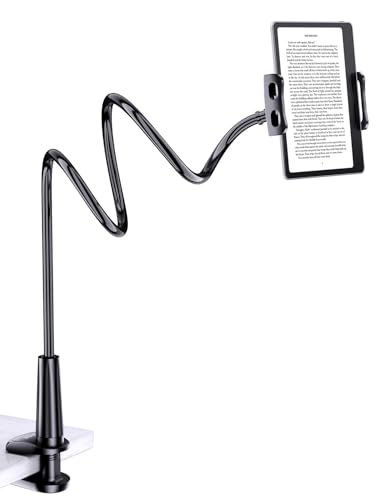
The Tryone Gooseneck is engineered with a clamp specifically optimized for non-standard surfaces, such as thick, upholstered, or uniquely shaped headboards. Its ability to grip securely where others slip makes it a favorite for beds lacking a traditional flat nightstand edge.
Clamping onto a headboard is an excellent way to reclaim floor or side-table space. It keeps the knitting environment tidy, ensuring that needles, stitch markers, and the tablet are all organized without creating a cluttered tangle of cords and hardware.
Because headboards can vary wildly in material, always test the clamp on a hidden area first to avoid compressing delicate fabric or marring wood finishes. Use a small piece of felt or silicone sheeting between the clamp and the headboard if the surface is particularly fragile.
Samhouse Tablet Mount: Easiest One-Hand Adjustment
The Samhouse Tablet Mount features a sophisticated ball-joint system that allows for instantaneous rotation and tilting. This is ideal for knitters who frequently switch between portrait mode for long row-by-row instructions and landscape mode for wide, multi-column charts.
The ability to adjust the angle with one hand is a game changer when the other hand is holding a delicate tension or managing a complex decrease. Keeping the rhythm of the knitting flow intact is paramount when working with tricky fibers like slippery silk or inelastic linen.
Because this mount emphasizes ease of movement, the joints can eventually loosen over time. It is a good practice to periodically tighten the tension screws to ensure the tablet remains locked in place during longer, focused knitting sessions.
CTA Digital Heavy-Duty Mount: For Large, Heavy Tabs
If the knitting setup involves a large-screen tablet with a heavy protective case, the CTA Digital Heavy-Duty Mount provides the necessary load-bearing capacity. Its construction is built for weight, preventing the dreaded “droop” that occurs when an oversized device overwhelms a standard arm.
Heavy-duty mounts are essential for large-format pattern displays, such as intricate Fair Isle motifs or large-scale schematic diagrams. When the tablet is substantial, a flimsy mount can actually become a safety hazard, potentially swinging down unexpectedly.
The trade-off for this strength is the weight and bulk of the arm itself. It is not designed for frequent moving or travel, so it is best suited for a permanent, dedicated bedside knitting station where it can be installed once and left in place.
Levo G2 Floor Stand: Best Freestanding Solution
The Levo G2 Floor Stand removes the need for clamps or furniture entirely, standing on its own base beside the bed. This is the gold standard for those whose bedsides have no suitable ledge or surface for a traditional mount.
A floor stand allows for perfect placement regardless of the bedroom layout. It is highly adjustable, making it easy to position the screen at the precise height of the eyes, which is critical for preventing eye fatigue when tracking complex charts for hours at a time.
While it occupies floor space, it offers the most stable and ergonomic experience available. It is an investment, but for those who spend significant time knitting in bed, the comfort and adjustability are unmatched by any clamp-on device.
How to Pick the Right Mount for Your Knitting Setup
When selecting a mount, first assess where you can realistically attach it. Measure the thickness of your nightstand or headboard to ensure the clamp’s jaw capacity matches your furniture, as many standard mounts fail on surfaces thicker than two inches.
Consider the weight of your tablet and whether you use a heavy cover. A mount that feels sturdy with a thin tablet may buckle under the weight of a thick, protective folio case. Always opt for a slightly higher weight rating than necessary to ensure the arm remains rigid over many months of regular use.
Finally, think about your typical pattern usage: * For portrait-style row-by-row text: Choose a mount with a simple, secure pivot. * For wide colorwork charts: Prioritize a ball-joint mount that rotates easily between orientations. * For complex lace: Ensure the mount is stable enough to remain rock-solid during frequent screen taps to zoom in on specific stitches.
Preventing Neck Strain: Positioning Your Tablet Arm
Neck strain in knitting is often the result of “looking down” into one’s lap for hours, which puts immense pressure on the cervical spine. The goal of a tablet mount is to bring the pattern to a neutral position where the chin remains level and the eyes look slightly forward or down at a gentle angle.
Position your tablet so the center of the screen is roughly at your eye level when your shoulders are relaxed and your spine is straight. Do not force yourself to adjust your body to the tablet; the arm must be flexible enough to adjust to you.
If you find yourself hunching toward the screen, the arm is either too low or too far away. Take a moment to adjust the gooseneck or articulated arm until you can sit back against your pillows with your arms supported. Proper posture is the best defense against the aches that keep a knitter from reaching their next milestone.
Clamp vs. Gooseneck: Which Style Is Best for You?
The “clamp” style mount usually refers to an articulated arm with distinct joints, offering precise, lockable positioning that is excellent for heavier devices. It feels stable and deliberate, making it ideal for the knitter who sets the screen once and works through a long, uninterrupted session.
The “gooseneck” style, by contrast, is a flexible, snake-like tube that offers infinite adjustment but can be springier. This is often more intuitive for quick, minute adjustments and works well for lighter tablets, provided you are willing to spend a few seconds fine-tuning the positioning until the vibration settles.
Ultimately, if your knitting space is static and your tablet is large, an articulated clamp arm will provide the best long-term experience. If you move around the bed or prefer a more flexible, quick-adjust system, a high-quality gooseneck is likely to satisfy your needs while keeping your digital pattern exactly where it belongs.
Finding the right bedside tablet mount is an investment in both your comfort and the quality of your knitting. By prioritizing stability and ergonomic positioning, you ensure that your focus remains entirely on your stitches, tension, and the beauty of the project at hand.