7 Best Document Scanners For Archiving Vintage Patterns
Preserve your vintage pattern collection with our top seven scanner picks. Discover devices that capture delicate details and textures for digital archiving.
Preserving vintage knitting patterns is a labor of love that protects the history of our craft from the inevitable decay of brittle, yellowing paper. Whether you’ve inherited a stack of 1950s sweater charts or a collection of lace leaflets, digitizing them ensures these designs survive for future generations. Choosing the right scanner is the first step toward building a searchable, permanent archive of your personal library. This guide evaluates the best tools to help you transition your physical pattern stash into a streamlined digital collection.
Fujitsu ScanSnap iX1600: Best Overall Performance


The ScanSnap iX1600 is the gold standard for anyone who wants to digitize a large stack of patterns in a single afternoon. Its intuitive touch screen allows you to scan directly to cloud services, making it perfect for organizing patterns by yarn weight or garment type without needing a computer tether.
For the knitter with a massive vintage collection, the speed and reliability here are unmatched. It handles varied paper sizes—from tiny pamphlet booklets to full-page charts—with impressive consistency. You won’t have to worry about the machine jamming when you’re midway through a complex fair isle pattern.
However, the high-speed rollers can be aggressive on extremely thin or delicate tissue-paper patterns. If your vintage sheets are crumbling at the edges, you might need to use a carrier sheet to protect them during the feed process.
Epson FastFoto FF-680W: Best for Vintage Photos

While designed for photos, the FastFoto FF-680W is a secret weapon for knitters who collect vintage pattern postcards or small, photo-based instruction cards. It handles these smaller, thicker media types with a gentleness that standard document scanners often lack.
The color reproduction is exceptional, which matters when you are trying to discern subtle color shifts in a faded vintage photograph of a finished garment. Being able to see the stitch definition in an old black-and-white photo can be the key to reverse-engineering a stitch pattern.
Keep in mind that this is a specialized tool; it isn’t meant for scanning large, multi-page booklets. If your library consists mostly of full-sized magazines, this won’t be your primary machine.
Brother ADS-3100: Best High Speed Batch Scanner

The Brother ADS-3100 is a workhorse that thrives when you have a high volume of patterns to process at once. If you’ve just acquired a box of patterns from an estate sale, this scanner will help you sort through them in record time.
It is incredibly robust and designed for heavy-duty use, much like a sturdy set of stainless steel needles that will last a lifetime. The software is straightforward, allowing you to create searchable PDFs so you can find specific terms like "cable" or "garter stitch" within your files later.
The trade-off is its size and lack of a built-in touch screen. It’s a utilitarian tool that expects you to do the heavy lifting on your computer side, but for sheer throughput, it is hard to beat.
Canon imageFORMULA R40: Best Office Document Tool
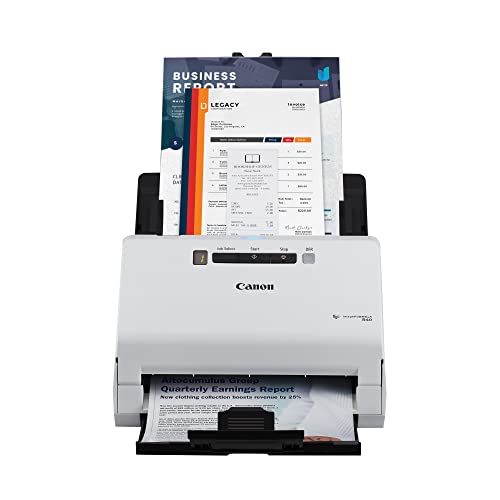
The Canon R40 is a reliable, no-nonsense scanner that excels at handling the standard 8.5×11 sheets found in most modern pattern printouts. It is an excellent choice for a knitter who wants to keep their current digital PDF patterns and vintage scans in one unified system.
It feeds paper smoothly and rarely requires manual intervention, which is a relief when you are scanning a long, complex lace chart. The image quality is crisp, ensuring that even the smallest stitch symbols remain legible on your tablet screen while you work.
While it lacks some of the bells and whistles of more expensive models, it is a dependable "set it and forget it" device. It’s the knitting equivalent of a classic, reliable workhorse yarn—it does exactly what it promises every single time.
Plustek ePhoto Z300: Best for Delicate Patterns

Vintage patterns are often fragile, and the Plustek ePhoto Z300 uses a unique "no-roller" feed system that is much safer for aged paper. This is the safest choice for those delicate, tissue-thin patterns that might tear under the pressure of a standard high-speed scanner.
Because it doesn’t pull the paper through rollers, you don’t have to worry about the machine snagging or creasing your precious originals. It’s perfect for the knitter who prioritizes the safety of the physical archive over high-speed batch processing.
The downside is that it is slower than the other scanners on this list. You will need to feed each page individually, but for the preservation of rare, historical patterns, that extra time is a small price to pay.
CZUR ET24 Pro: Best Overhead Book Scanner Choice
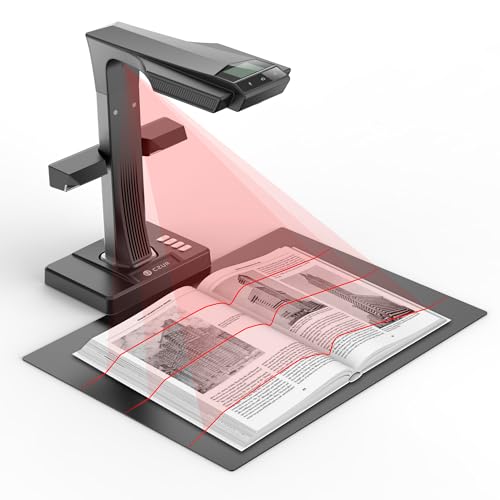
The CZUR ET24 Pro is a game-changer for scanning patterns that are bound in vintage books or thick magazines. By using an overhead camera, it allows you to scan pages without having to rip the spine of a precious, out-of-print knitting book.
The software automatically flattens the curve of the page, which is essential for getting a clear view of charts that might be tucked into the gutter of a book. It’s the only way to digitize a rare collection without damaging the physical binding.
This method does require a bit more setup time, as you have to position the book carefully under the light. It’s not for quick, mindless scanning, but it is the best solution for preserving your most valuable library pieces.
Doxie Go SE Wi-Fi: Best Portable Pattern Scanner
If you find yourself at a local yarn shop or a friend’s house and want to scan a pattern on the fly, the Doxie Go SE is your best friend. It is battery-powered, compact, and requires no computer to function, saving your scans directly to an SD card.
It’s about the size of a rolled-up set of circular needles, making it easy to toss into your project bag. While it isn’t meant for massive archives, it is perfect for capturing a single pattern or a few pages of a magazine you don’t own.
The trade-off for portability is a slightly slower scan speed and a manual feed process. It’s a specialized tool for the knitter on the move who wants to grow their digital library one pattern at a time.
Why Digitizing Vintage Patterns Saves Your Library
- Preventing Oxidation: Old paper becomes acidic and brittle over time; digitizing stops the cycle of degradation.
- Space Management: A digital library takes up zero physical shelf space, leaving more room for your yarn stash.
- Searchability: You can tag files by yarn weight, needle size, or construction type, making patterns instantly findable.
- Sharing: You can easily share a digital copy with a friend without risking the loss of your original copy.
Essential Tips for Scanning Fragile Paper Charts
When dealing with vintage paper, always check for staples or paperclips first, as these can scratch the scanner glass. If the paper is extremely brittle, place it inside a clear, non-glare plastic sheet protector before scanning to provide structural support.
Adjust your scanner settings to a higher DPI (dots per inch) for intricate lace charts. This ensures that the fine lines of the chart don’t blur when you zoom in on your tablet or computer screen.
- Clean the glass: Dust on the scanner glass can create lines on your digital image, which is frustrating when trying to read a row-by-row instruction.
- Use neutral backgrounds: If the pattern is thin, place a piece of black or white cardstock behind it to prevent "bleed-through" from the other side of the page.
- Backup immediately: Once you scan, back up your files to both a cloud service and an external hard drive to ensure your digital library is as secure as possible.
How to Organize Your Digital Knitting Pattern Arc
Start by creating a folder structure that mimics your physical preferences. I recommend organizing by category, such as "Sweaters," "Socks," "Shawls," and "Accessories," then sub-categorizing by yarn weight (e.g., Fingering, Worsted, Bulky).
Use consistent naming conventions for your files so you don’t lose track of your hard work. A format like YYYY-MM-DD_PatternName_Designer.pdf ensures that your files remain sorted chronologically and alphabetically.
- Metadata is key: If your software allows, add tags for "Needle Size," "Gauge," and "Fiber Content."
- Cloud Syncing: Keep your library in a cloud folder so you can access your patterns on your phone while you’re shopping for yarn.
- Maintenance: Set aside time once a year to review your digital library and delete duplicates or patterns you know you will never knit.
Digitizing your vintage pattern collection is an investment in the longevity of your craft and a way to honor the designers of the past. Whether you choose a high-speed scanner for a large archive or an overhead device for delicate books, the result is a clean, accessible, and protected library. Take your time with the process, and remember that every file you save is a piece of knitting history preserved. Happy scanning, and may your digital library be as well-loved as your physical one.