7 Best Drafting Tools For Custom Patterns To Own
Upgrade your sewing process with our expert list of the 7 best drafting tools for custom patterns. Explore these essential items and start tailoring today.
Designing a custom knitting pattern requires more than just creative inspiration; it demands a precise translation of vision into technical notation. Whether mapping out complex stranded colorwork or grading a sweater across multiple sizes, the quality of the drafting tool directly dictates the clarity of the finished instructions. Selecting the right software or physical aid streamlines the process, preventing mathematical errors before the first stitch is even cast on. These seven tools represent the gold standard for transforming conceptual ideas into reliable, professional-grade knitting patterns.
Stitch Fiddle Premium: Best for Online Charting


Stitch Fiddle has become the industry standard for knitters who prefer browser-based design without the steep learning curve of professional software. The premium version allows for custom gauge settings, which is essential because knitting stitches are not square; they are typically wider than they are tall.
By inputting exact row and stitch counts, the platform adjusts the grid to accurately reflect the visual outcome of the fabric. This prevents the “squashed” appearance that often occurs when using standard square graph paper for colorwork designs.
The interface is intuitive, offering a drag-and-drop experience that makes creating intricate intarsia or fair isle charts feel like painting. While it lacks the advanced grading tools required for multi-size garment production, it remains unmatched for quick, precise chart generation.
EnvisioKnit: Powerhouse for Pro Designers
EnvisioKnit is the primary software for serious designers who treat pattern drafting as a technical discipline. It provides a robust suite of tools that go far beyond simple grid drawing, specifically focusing on the mathematical requirements of garment construction.
This software handles the complexities of cables, lace, and complex colorwork motifs with equal ease. The program excels at keeping track of intricate stitch repeats, ensuring that lace decreases and yarn-overs align correctly across every row of a project.
It is a significant investment for those who are not designing patterns professionally. However, for anyone tackling complex, multi-size sweaters, the time saved by its automated features makes it a worthwhile addition to the digital toolkit.
KnitPro Knitter’s Graph Paper: Essential Analog Tool
There is a distinct advantage to sketching designs by hand, as it forces an intimate understanding of how stitches interact within a fabric. KnitPro’s specialized graph paper is printed with rectangular cells to mimic the actual geometry of a knitted stitch.
Using standard square graph paper often leads to distorted designs, as a single stitch is almost always wider than it is high. This paper forces the designer to visualize the project at the correct aspect ratio, preventing the common disappointment of a design looking perfect on paper but elongated in the final knit.
For beginners, this is the most affordable way to master chart-making logic. It removes the technological barrier to entry, allowing the focus to remain purely on motif development and stitch placement.
Barbara Walker’s Treasuries: The Stitch Bible

No digital tool can replace the foundational knowledge housed within Barbara Walker’s stitch dictionaries. These volumes serve as the ultimate reference for any custom designer looking to understand how different stitch patterns behave in various fibers.
These books are not just collections of patterns; they are manuals on stitch manipulation. By studying the way textures, cables, and lace motifs are constructed, a designer learns how to successfully combine elements into a cohesive, readable, and functional garment.
Even in an age of searchable databases, having these physical books open on a drafting desk provides a tactile reference that digital files cannot match. They provide the necessary context for why certain stitch combinations work—and why others fail.
Procreate for iPad: For the Visual Designer
Procreate has evolved into a surprisingly powerful tool for knitters who prefer a free-form, visual approach to pattern design. While it lacks built-in knitting symbols, its layering capabilities allow for incredible precision when drawing custom colorwork motifs.
Designers can create a custom grid template as a base layer and then paint colorwork directly over it. This method is particularly effective for designing “art-led” garments where the placement of color is more important than strict geometric repetition.
The downside is the lack of automated stitch counting and written instruction generation. This tool is best suited for visual thinkers who prefer to map out the “big picture” before translating it into a technical, row-by-row format in a different program.
Google Sheets: The Free and Flexible Option
Google Sheets is a secret weapon for knitters who need to track complex garment measurements and grading math. By adjusting the cell dimensions to be rectangular, it becomes a functional, infinitely customizable grid for colorwork charts.
The true power of a spreadsheet lies in the ability to use formulas for grading. Once a base size is determined, formulas can automatically calculate the row and stitch counts for larger or smaller sizes, significantly reducing the risk of human error in multi-size patterns.
While it lacks the specialized stitch symbols found in dedicated software, it is the most efficient tool for organizing the technical data behind a pattern. It is the perfect choice for the pragmatic knitter who values speed and accuracy over aesthetic interface features.
Clover Knitters’ Tools Set: Must-Have Physical Kit
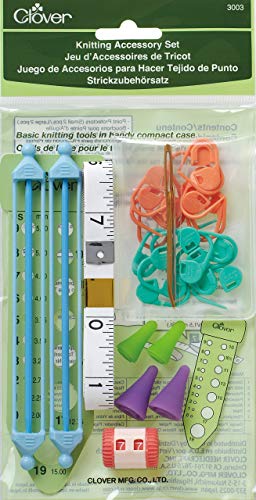
A drafting process is incomplete without the physical tools used to verify gauge and measure swatches. The Clover Knitters’ Tool Set provides the essential hardware for checking row and stitch counts, which is the foundational data for any custom design.
Without an accurate gauge measurement, even the most sophisticated digital chart will produce a garment that does not fit. A high-quality gauge ruler is required to ensure that measurements are consistent across different types of yarn, from fine lace-weight to heavy, airy wool.
This set also includes essential accessories for managing the drafting phase, such as locking stitch markers and measuring tapes. It acts as the physical bridge between the conceptual design on the page and the tangible reality of the yarn in the hands.
How to Pick the Right Pattern Drafting Tool
Choosing the right tool depends entirely on whether the primary goal is artistic expression or technical production. If the objective is to design simple colorwork accessories, browser-based tools or analog graph paper are usually sufficient.
For those venturing into garment design, the focus must shift toward professional-grade software. These tools handle the necessary grading math, ensuring that a pattern scales correctly from an extra-small to a double-extra-large without losing its structural integrity.
Always consider the learning curve before committing to an expensive software suite. If the design process is infrequent, stick to accessible tools like spreadsheets or iPad applications to avoid wasting time on complex programs that are rarely used.
Understanding Stitch Gauge and Aspect Ratio
Stitch gauge is the single most critical factor in successful pattern drafting. Because knitted stitches are inherently rectangular, they occupy a different amount of horizontal space than vertical space, a relationship known as the aspect ratio.
If this ratio is ignored, a design drafted on a square grid will appear distorted once it is worked in yarn. A simple square will look like a flattened oval, and a round motif will appear squashed, potentially ruining the aesthetic of a carefully planned design.
Always calculate the gauge in both directions—stitches per inch and rows per inch—before committing to a chart. Adjust the grid layout accordingly, ensuring that the drafting paper or software accurately represents the final dimensions of the knitted fabric.
Tips for Creating Clear, Readable Charts
The hallmark of a great pattern is accessibility; a chart should be immediately understandable to any knitter who picks it up. Use a standard legend for all symbols and ensure that the color palette remains high-contrast, even for those printing in black and white.
Label every row and repeat clearly to avoid confusion during the knitting process. If a chart is complex, break it into smaller, manageable sections, and provide both written instructions and a visual reference to cater to different learning styles.
Ultimately, test the chart by knitting a small swatch of the design. This simple step reveals hidden complexities or errors that might not be visible on the screen, ensuring the final pattern is as enjoyable to follow as it was to create.
Effective pattern drafting is a blend of mathematical precision and creative foresight. By pairing the right tools with an understanding of gauge and construction, any knitter can transition from following someone else’s work to creating professional, custom designs with confidence.